
Cornerstone only: Activate text message notifications
After a practice manager activates text message notifications, your device shows messages about text messages that you receive in the Vello inbox.
Configure notification settings for Google Chrome in your device's system settings. For more information, refer to Cornerstone only: Text message notifications.
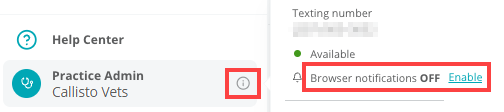
Note: As an alternative procedure to activate text message notifications:Figure 1. i button and Browser notifications setting
- Do step 1.
- For step 2, select the i button that shows adjacent to Practice Admin in the left sidebar.
- Set Browser notifications to Enable
- In the left sidebar, select Text Messages.Note: If the left sidebar is closed, select the text messages button:Vello shows a Text Messages screen.
- In the Enable desktop notifications to get alerted when clients message you. section, select Enable notifications.Vello shows a Get notifications? pop up window.