Vello release notes: December 17, 2025
Read about features and changes in Vello.
Neo only
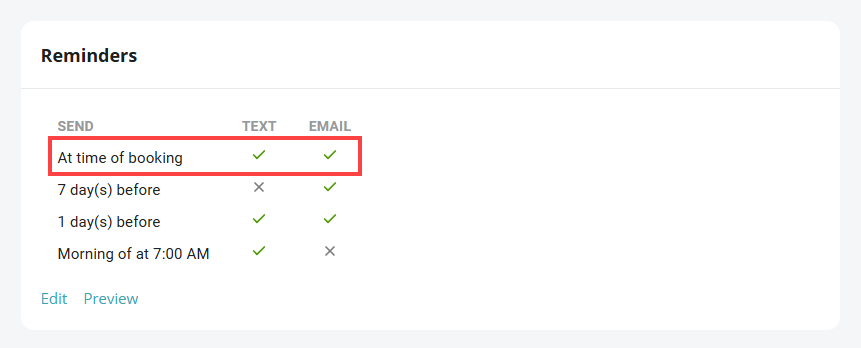
New Appointment Booked setting in the Appointment Reminders screen: This version of Vello automatically sends clients an email and text message to tell them that they have a scheduled appointment with your practice. Vello automatically sends the email message and text message when one of these occurs:
- A client uses the Vello client portal to make an appointment directly in your PIMS calendar
- You use Vello to add an appointment request to your PIMS calendar
- You make an appointment directly in your PIMS calendar (for example, if a client makes a phone call to your practice to make an appointment)
- You change the time of a scheduled appointment in your PIMS calendar
Vello automatically sends the emails messages and text messages between 9:00 AM and 8:00 PM local time. If a client makes an appointment before 9:00 AM, Vello sends the messages after 9:00 AM during the same day. If a client makes an appointment after 8:00 PM, Vello sends the messages after 9:00 AM during next day.
Previously, for clients to know that they had a scheduled appointment, it was necessary for them to:
- Wait for an appointment reminder
- Contact your practice directly
Note: If your practice has appointment reminders activated, Vello automatically activates the Appointment Booked setting. You can get access to the setting in the Appointment Reminders screen: