
Vello form designer: Form variables
Use form variables to quickly and easily show pet and pet owner information in a form (for example, pet name or pet owner address).
The available form variables show in the left sidebar of the form designer:
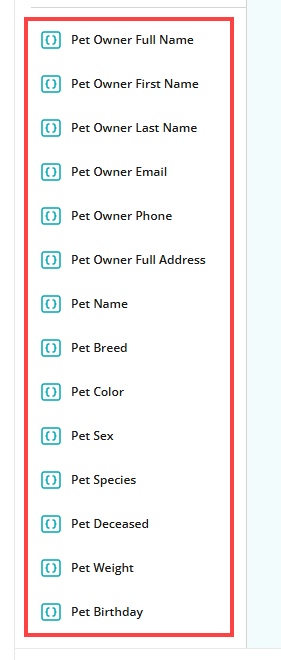
To add a form variable to a form, select its name in the left sidebar or drag it to Add Question button that shows in the form designer.
Note: A form only shows form variable output if a pet owner is signed in to the Vello client portal. If a client is not signed in, a variable shows no output.
This table gives
- The name of each form variable
- The output that the variable shows in a form
| Form variable name | Output |
|---|---|
| Pet Name | Shows the pet name. |
| Pet Owner Full Address | Shows the full address of the pet owner. |
| Pet Owner Phone | Shows the phone number of the pet owner. |
| Pet Owner Email | Shows the email address of the pet owner. |
| Pet Owner Last Name | Shows the last name of the pet owner. |
| Pet Owner First Name | Shows the first name of the pet owner. |
| Pet Owner Full Name | Shows the first and last name of the pet owner. |
| Pet Breed | Shows the pet breed. |
| Pet Color | Shows the pet color. |
| Pet Sex | Shows the pet sex. |
| Pet Species | Shows the pet species. |
| Pet Deceased | Shows true or false. |
| Pet Weight | Shows the pet weight. |
| Pet Birthday | Shows the date of birth of the pet. |
Form variables in the text of a question
You can add a form variable to the text of a question. For example: “Has {petname} eaten in the last 24 hours?” When a client opens the form, Vello shows the value of the variable in the question text.
To add a form variable to the text of a question:
- Select the question text
- In the question toolbar, select the Add variable button
- Select the applicable variable
Vello adds the variable to the question text, for example {petname}. The variables that you can add to the question text are:
- The variables in the form variables table
- The practice name
- The appointment date
Note: If Vello cannot find a value for a variable, the question shows general text for some variables:
- your pet for Pet Name
- Client for Pet Owner Full Name and Pet Owner First Name
- our practice for the practice name
- your appointment for the appointment date
Note: If a variable name in the question text is not correct (for example, a typing error), Vello shows the Unrecognized variable dialog box when you select Publish. Select Fix variable to go back to the form designer. You cannot publish the form until you correct or remove the variable name. You can select Save draft to keep the form with the incorrect variable name.